


MyTSA
3.91.48K Reviews
App Specs
- Version
- 5.1.0
- Updated On
- License
- Free
- Downloads
- 1,000,000+
- Developer
- TSA Mobile Team
- Categories
- Travel & Local
- Platform
- Android, iOS
Screenshots
 Analysis by AppCompare
When I’m getting ready for a flight, the questions that slow me down are usually practical: how much time should I leave for security, and will an awkward item in my bag cause trouble? MyTSA is built around those everyday travel concerns. I find it most useful as a quick reference for navigating U.S. airport security, rather than as an all-in-one trip planner. That distinction matters: it can help me prepare, but I still rely on the airline and airport for details that can change quickly.
MyTSA today: a focused travel reference
MyTSA is a free Travel & Local app from the TSA Mobile Team. It has a 3.9 average from around 4,500 ratings and more than a million installs, so it has reached plenty of travelers, though those numbers alone do not tell me whether it will fit your routine. Its Everyone age rating makes it broadly accessible, and it is currently at version 4.5.0. The app first appeared on November 1, 2012, which gives it a long history as a mobile source for passenger information.
That history is useful context, but I would not treat the version number as proof of any particular recent feature or redesign. What I can judge is the app’s present role: it brings TSA-oriented answers into a compact place, so I can check a security question without starting with a general web search. It is a narrower tool than a flight-booking or itinerary app, and that focus is one of its strengths.
Useful before packing, not a substitute for judgment
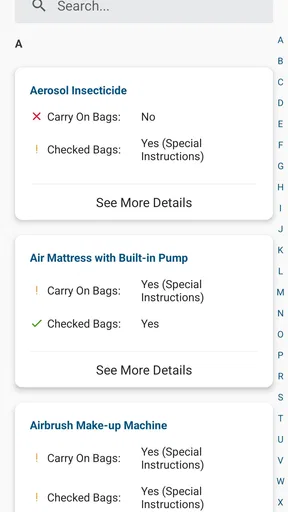
The item guidance is the part I would reach for while packing. If I am unsure about a toiletry, a gift, or a piece of equipment, I can look up the item and check how the guidance treats carry-on and checked baggage. One practical habit is to search using the ordinary name of the object, then consider how I plan to pack it. A broad item name may not capture every variation, so I would not assume that a result settles questions about size, materials, or an unusual configuration.
This is particularly handy for a last-minute trip, when I do not want to unpack and repack at the airport because I made a preventable assumption. Still, I treat the app as preparation, not a guarantee of what will happen at the checkpoint. If an item is unusual or especially important to bring, I would check the current official guidance before leaving and allow time to resolve uncertainty. The final screening decision is not something a mobile reference can make for me.
Wait-time information needs a little perspective
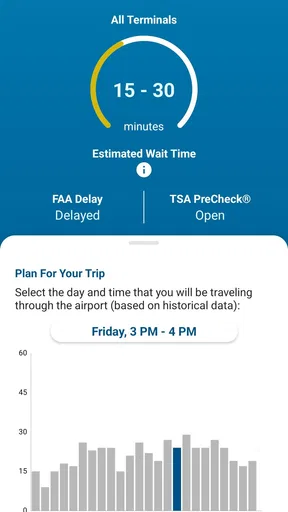
Security wait information can help me make a rough plan, but I would use it as a snapshot rather than a promise. Lines shift, and the time I see before leaving home may not match conditions when I reach the airport. A sensible use is to compare the estimate with my own needs: a tight connection, checked bags, mobility considerations, or traveling with children all call for more breathing room than a simple number can capture.
I would also avoid using a short estimate as permission to arrive later than the airline recommends. The app can inform a decision, but it cannot account for every part of getting to the gate, such as bag drop, boarding cutoffs, or an unexpected queue elsewhere in the terminal. For me, the best value is reducing uncertainty enough to plan more calmly, not shaving a few minutes off an already risky schedule.
Worth Reading Before You Choose

EA SPORTS FC Mobile 26 Is a Bigger Football Game, but It Takes Time

Flipboard Shows What News Apps Must Do Beyond the Feed

Switching to Android Auto Means Rethinking Your Driving Routine

Google Calendar Makes a Crowded Week Easier to Manage

Ludo King Makes the Most of the Minutes Between Plans

Baby Panda World Brings Quick Play to Modern Phones, but Its Game Library Feels Busy
Where it fits alongside airline and airport tools
MyTSA and an airline app answer different questions. I would turn to MyTSA for TSA-related preparation and passenger guidance, then use the airline’s own app for booking details, boarding information, and flight changes. An airport’s own information can be more relevant for terminal-specific services and local directions. General map or travel apps may be better for comparing routes, finding nearby places, or organizing a whole itinerary.
Keeping those roles separate prevents a common travel-day mistake: assuming that one app is the authority on everything. MyTSA can be a convenient companion, but it is not a replacement for airline alerts or an airport’s current directions. If I have a delayed flight or a tight connection, I check the airline’s latest notice first and use the TSA app for the security-related questions it is meant to address.
A realistic example is a morning flight with a connection later in the day. The night before, I can use the item lookup to check a questionable object and review security information. Before leaving, I can use a wait-time estimate to get a sense of the airport situation, while still following the airline’s arrival guidance. At the airport, I keep airline notifications open for gate or schedule changes. That small division of labor is more dependable than expecting MyTSA to manage the whole journey.
What the version history does—and does not—tell me
The current version, 4.5.0, shows that MyTSA has continued to receive versioned releases since its 2012 debut. For an existing user, that is a reason to keep the app updated through the usual app-store process: current software is the sensible choice when relying on a reference tool. But a version label does not tell me which screens changed, whether a specific airport’s information has been refreshed, or how any particular feature has evolved. I would not infer those details from the number alone.
In practical terms, a long-running app can be familiar to returning travelers while still requiring a fresh look when they open it after a while. I would check the current guidance for the trip I am taking rather than rely on something I remember from a previous journey. Travel rules and airport conditions are not interchangeable, and an old search or saved mental note should not take precedence over what the app currently presents.
Good fit for quick checks, less useful as a full trip organizer
I would recommend MyTSA to occasional flyers who want an accessible place to start with security questions, and to frequent travelers who prefer a dedicated TSA reference alongside their airline and airport apps. It is also useful for the person in a household who does most of the packing: checking an uncertain item before bags are zipped can prevent a stressful conversation at the checkpoint.
I would skip it as a primary travel app if what I need is a single place to book, store a complete itinerary, track every reservation, or get detailed directions through a particular terminal. Its purpose is more specific. People who already know their packing routine and rarely have TSA questions may not open it often enough to justify keeping another travel app on their phone. For those travelers, the airline app and a simple web search may be enough.
There is also a useful trade-off in having a focused official-source app: it can be more direct for TSA matters than a broad travel platform, but it cannot replace local context. A general search may surface airport-specific advice faster, while MyTSA is the more natural place to begin when the question is about TSA passenger guidance. I would use both carefully when the answer affects a valuable item or a tight travel plan, checking that the information applies to the situation in front of me.
Everyday workflow and small precautions
My preferred workflow is to check questions at home, not while standing at the checkpoint. I look up uncertain items before packing, note any ambiguity, and decide whether I can leave the item behind or verify the guidance further. Then, on travel day, I use wait-time information as one planning input and keep the airline’s channel available for flight-specific changes. This takes advantage of the app without asking it to do jobs it was not designed for.
For a family trip, I would also check each person’s bag rather than assuming one search covers everything. A child’s toy, a medical-related item, or a work tool can raise a different question from ordinary clothes and toiletries. The useful insight is not simply “search before you go”; it is to search for the item as it will actually be carried and to leave room for uncertainty when the item is unusual. That is a safer approach than relying on a broad category label.
If connectivity or time is a concern, I would do the research before heading out rather than waiting until the airport. A reference app is most valuable when I can read the answer calmly and follow up if it is unclear. At the checkpoint, there may be little opportunity to compare interpretations or change plans. The app can reduce avoidable surprises, but good timing and a backup plan still matter.
What I would watch on future trips
When I return to MyTSA after an update, I pay attention to whether the parts I actually use remain easy to find and whether the guidance is clear enough for the question I have. I also look for current, trip-relevant information instead of assuming a familiar screen reflects conditions at every airport. Those are more meaningful checks for me than expecting a version number to signal a particular improvement.
The main limitation is the boundary between general TSA guidance and a traveler’s exact circumstances. An item can have details that change how I need to interpret an answer, and a wait estimate cannot predict everything that may happen before boarding. If MyTSA leaves me uncertain, I treat that uncertainty as a prompt to verify rather than as a reason to guess. That cautious approach is especially worthwhile for a tight connection or an item I cannot easily replace.
A practical companion, with realistic expectations
Have you ever found yourself frantically checking your phone for flight updates or security wait times? Yeah, me too. Traveling can be a bit of a headache, but the MyTSA app is here to ease the stress. I decided to give it a whirl and see if it lives up to the hype. Spoiler alert: it does.
Getting Started with MyTSA
First things first, downloading the app is a breeze. Available on both Android and iOS, MyTSA is just a quick search away on your app store of choice. Installation is smooth, and before you know it, you’re ready to dive in.
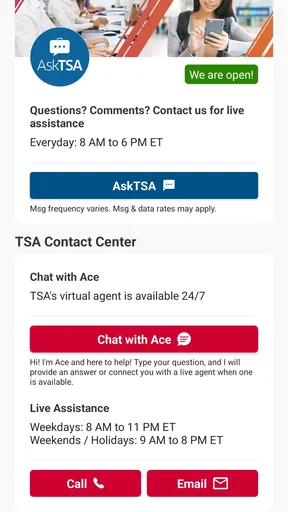
Once you open the app, you’re greeted with a sleek and intuitive interface. It’s not overloaded with unnecessary frills, which I appreciate. The main menu is straightforward, giving you quick access to all the important features. From checking security wait times to finding out about TSA-approved items, it’s all right there at your fingertips.
Security Wait Times: Less Guesswork, More Chill
If you’ve ever been stuck in a never-ending security line, you know how crucial it is to plan ahead. The security wait times feature is a lifesaver. It provides real-time updates on how long you can expect to wait at different airports. I tested this feature on a busy travel day, and it was spot on. Knowing the wait time in advance allowed me to adjust my schedule and avoid any unnecessary stress.
What Can I Bring? The Mystery Solved
We’ve all been there—standing in line, wondering if that bottle of lotion is going to get confiscated. With the “What Can I Bring?” section, those days are over. The app provides a comprehensive list of items and whether they’re allowed in your carry-on or checked luggage. I found this feature incredibly handy, especially when packing for a last-minute trip. It’s like having a TSA agent in your pocket, without the intimidating uniform.
Flight Delays and More: Staying in the Know
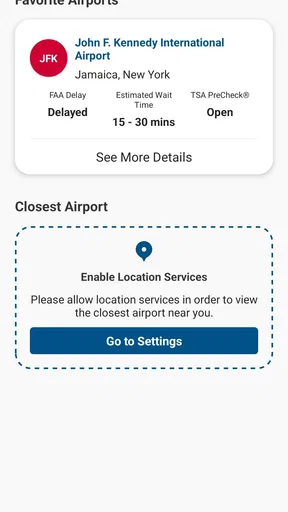
The app doesn’t stop at security lines and packing tips; it also keeps you updated on flight delays. This feature is particularly useful when you’re juggling multiple flights or tight connections. While it doesn’t replace the airline’s notifications, it’s a solid backup and helps ensure you’re always in the loop. Plus, it’s nice to have all your travel info consolidated in one place.
Another neat feature is the ability to check airport information. Whether you’re looking for a quick meal before your flight or need to find a specific terminal, the app provides a wealth of information about various airports. It’s like having a mini travel guide right in your pocket.
User Experience: Smooth Sailing
One of the standout aspects of the MyTSA app is its user-friendly design. Navigating through the app is as easy as pie. The menus are simple, and the information is presented in a clear and concise manner. Even if you’re not tech-savvy, you’ll have no trouble finding what you need.
The app’s performance is also noteworthy. During my time using it, I didn’t experience any crashes or lags. Everything loaded quickly, which is a big plus when you’re in a rush and need information fast. The developers did an excellent job optimizing the app for seamless usage.
Final Thoughts: A Must-Have Travel Companion
In a nutshell, the MyTSA app is a game-changer for frequent flyers and occasional travelers alike. It takes a lot of the guesswork out of the travel process, providing you with up-to-date information and helpful tips. Whether you’re navigating a busy airport or packing for your next adventure, this app is your trusty sidekick.
So, if you’re looking for a way to make your travel experience a bit smoother, give the MyTSA app a try. It’s free, easy to use, and packed with features that will make your travel day less stressful. Download it today and see for yourself!
Pros
- Real-time airport status updates.
- Customizable alerts for flight changes.
- TSA security checkpoint wait times.
- User-friendly interface for quick navigation.
- Travel tips and guidelines included.
Cons
- Limited international airport data.
- Requires internet for most features.
- Occasional app crashes reported.
- No offline mode for travel tips.
- Some features need location access.
FAQs for MyTSA
What is MyTSA and how does it work?
MyTSA is a mobile application designed to provide travelers with real-time information about airport security wait times, flight delays, and other essential travel details. The app aggregates data from various sources, including crowd-sourced reports, to help users plan their airport experience more efficiently. It also offers access to TSA PreCheck locations and tips for preparing for security screening.
Is MyTSA available for both Android and iOS devices?
Yes, MyTSA is available for both Android and iOS platforms. Users can download the app from the Google Play Store or the Apple App Store. The app is free to download and use, providing a valuable resource for travelers looking to streamline their airport experience with up-to-date information.
Does MyTSA require an internet connection to function?
Yes, MyTSA requires an internet connection to access real-time data and updates. The app relies on live information from TSA and airport sources to provide accurate wait times and security line updates. For the best experience, ensure you have a stable internet connection when using the app at the airport.
Can I use MyTSA to check TSA PreCheck availability at airports?
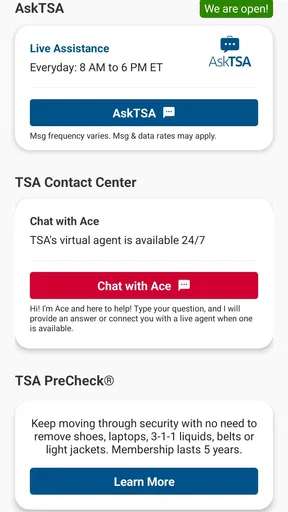
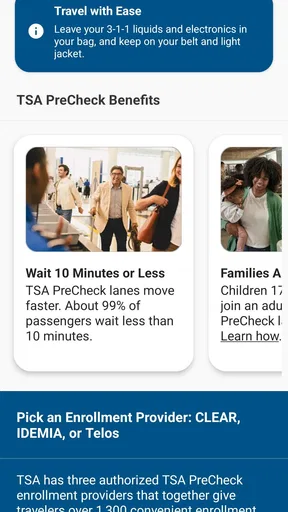
Absolutely. MyTSA includes information on TSA PreCheck lanes and their operating hours at various airports. This feature helps users quickly determine if and when they can use the expedited security screening service, making it easier to plan for a faster airport experience.
How accurate is the information provided by MyTSA?
The accuracy of MyTSA largely depends on the data sources it uses, including both TSA and crowd-sourced reports. While the app strives to provide the most up-to-date information, users should be aware that unexpected changes at airports may occur. It’s always a good idea to allow extra time for unforeseen circumstances.


